
What are static pages?
Are you using static pages and want to understand how they work in greater detail? Look no further
Updated
Understanding Static Pages in Pitchlane
When creating personalized videos in Pitchlane, you’ll work with two types of pages: static and dynamic. Each plays a different role in how your video is experienced—and understanding when to use each is essential to creating effective outreach that scales.
What Are Static Pages?
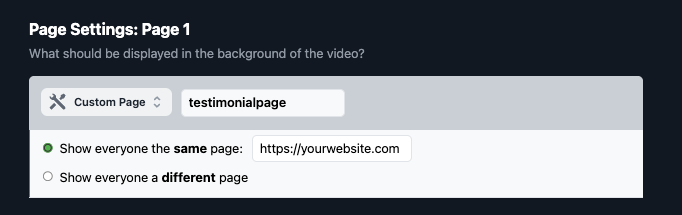
Static pages are pages that remain exactly the same for every lead and every video you send.
They’re ideal for showing consistent information that doesn’t need to change from one person to the next. Common examples include:
- Your website homepage or landing page
- A slide showing a customer case study
- A screenshot of your product or platform
- Intro or outro slides with your company branding
These pages are great for setting context, building credibility, and delivering consistent messaging throughout your video.
Why You Can’t Use Only Static Pages
Pitchlane is built for personalized video at scale. That means each video should adapt to the individual viewer—making it feel like it was created just for them.
To enable this, Pitchlane requires at least one dynamic page in every video. If your video includes only static pages, it won’t render.
This is by design. If there’s no personalization, you’re essentially just creating a standard screen recording—something you could do with basic video tools. By ensuring your video includes at least one dynamic element, Pitchlane helps you create real, scalable personalization without wasting time or money.
When Not to Use Dynamic Pages
It’s important to use dynamic pages only when they’re actually needed.
If a page’s content is the same for every lead, there’s no reason to use a dynamic page. In fact, doing so can slow you down unnecessarily.
For example:
- Showing the same case study to all prospects? Use a static page.
- Including your company’s website? Make it static unless you’re tailoring the URL per lead.
This keeps your video setup cleaner—and ensures dynamic pages are used where they’ll have the most impact.
Dynamic vs. Static: What’s the Difference?
| **Static Page ** | Dynamic Page | |
|---|---|---|
| Changes per lead? | :cross_mark: No | :check_mark_button: Yes |
| Personalized content? | :cross_mark: None | :check_mark_button: Yes |
| Required to render? | :cross_mark: Not sufficient on its own | :check_mark_button: At least one required |
| Good for… | Branding, case studies, consistent info | Personal websites, LinkedIn, dashboards |
Best Practice: Combine Static and Dynamic
The strongest Pitchlane videos use a mix of static and dynamic pages. This gives you the best of both worlds—personalization where it counts, and consistency where it helps.
Example video structure:
- Static – Intro slide with your logo and value proposition
- Dynamic – Lead’s website or LinkedIn profile
- Dynamic – Personalized message or dashboard
- Static – Industry-specific case study or testimonial
- Static – Closing slide with your CTA or contact info
This structure keeps your message polished while still making each lead feel like the video was made just for them.
Key Takeaways
- Static pages do not change per lead. Use them for consistent elements like your own website or a product screenshot.
- Dynamic pages personalize the experience. They’re required to render a video in Pitchlane.
- Do not use dynamic pages if the URL or content is the same for every lead—use a static page instead.
- The best-performing videos blend static and dynamic pages for clarity, consistency, and personalization.